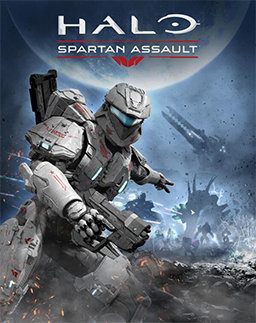

Halo: Spartan Assault Steam CD Key
12 in stock
Halo: Spartan Assault brings top-down, mission-based Halo action to Steam, with a thirty-mission single-player campaign. Compare that perspective and mode with the experience you want; console co-op descriptions do not establish the same Steam feature. Check the intended PC input, DirectX feature level 10 and current Steam client requirements. Spartan Strike and larger Halo bundles are separate purchases.
€5.40
12 in stock
Enlist as a Spartan soldier and sharpen your tactical skills in battle! Set between the events of Halo 3 and Halo 4, Halo: Spartan Assault, developed by 343 Industries in conjunction with Vanguard Games, is a new chapter within the award-winning Halo universe. Spanning over 30 missions in vibrant, dangerous worlds, dive deeper into the backstory of Human-Covenant wars and the origins of the Spartan Ops program.
Choosing Spartan Assault on Steam and checking the PC
Halo: Spartan Assault uses a top-down view for mission-based action against the Covenant. That perspective is a useful first comparison with the main Halo games: you control the action while looking over the battlefield, rather than choosing it as another first-person campaign. Think about whether you enjoy noticing enemies and routes around a character from that viewpoint. The Halo name identifies the setting, but it does not make every release use the same style of play.
The Steam publisher describes a campaign of thirty missions, with weapons, vehicles and armour abilities drawn from Halo. Consider whether a sequence of defined missions suits the sessions you want to have. You may prefer learning the demands of one encounter and improving a result, or you may be looking for a longer narrative stretch between stopping points. That preference is more informative than expecting every game in the franchise to match the structure of a numbered Halo campaign.
The Steam feature list identifies single-player play. Xbox launch material separately describes cooperative additions for its console release, so do not transfer those mode promises to this PC offer. A score comparison or leaderboard is also different from playing a campaign cooperatively. If you want to join another person in the same mission, verify the actual mode of the exact platform version before choosing a code.
For input, the Steam listing names keyboard and mouse, a USB Xbox controller and touch controls on supported devices. The PC input and controller checklist helps you compare the intended device with the specific title. A familiar console controller shape alone is not evidence that every connection method, layout or accessory behaves the same way in a PC release.
There is a specific graphics check in the game’s requirements: DirectX feature level 10. A feature level describes graphics capabilities, and should be checked separately from the DirectX version number installed in Windows. The older PC hardware and requirements comparison explains why a short historical specification still needs a real hardware comparison. Do not judge compatibility from the game’s age, its top-down viewpoint or a general statement that a computer has DirectX installed.
Also compare current Steam client support with the older Windows names in a historical game specification. The PC requirements reading guide separates those checks and helps you consider processor, graphics, memory and storage together. This offer names Spartan Assault on Steam. A Spartan Bundle that also lists Spartan Strike, or a different Halo collection, is a separate included-content comparison. Choose the named game for its mission-based top-down action once the PC, input arrangement and actual license match your plan.
Related products
-
Action, Adventure, Racing
LocoCycle XBOX One Key
Follow I.R.I.S. and Pablo in LocoCycle's comic motorcycle escape. This offer names an Xbox One key. Compare the action-focused game with your preferences, then check the intended console, Xbox ownership, language needs and actual code conditions.
SKU: KG-10276 -
-